Free Hi-Res Blank Polaroid Frames
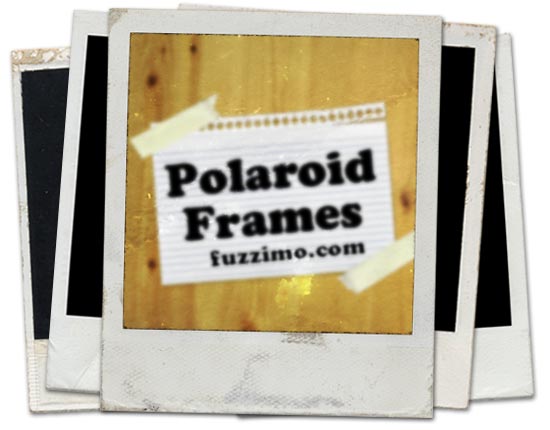
Ah, the good old days. The Polaroid 600 instant photos have been around forever and despite technological advances they are as cool as ever. Well at least in the design world :). I mean who hasn’t played with a Polaroid template turning images into vintage photos? So in that respect, here are some high resolution Polaroid frame images (around 5100x4200px).
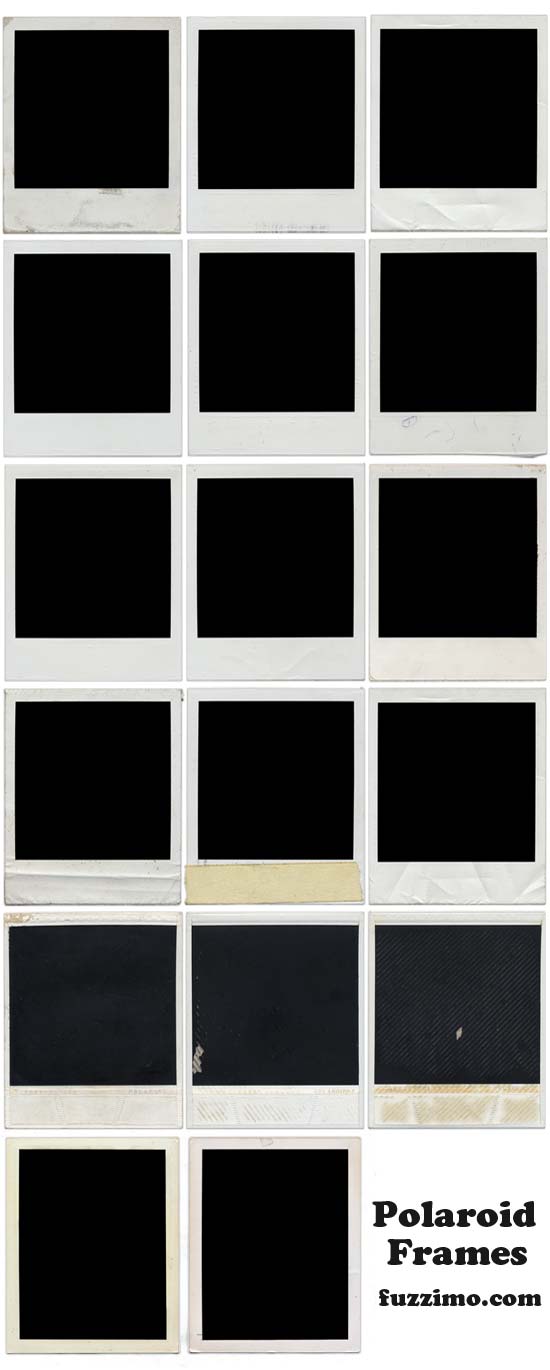
There are 14 unique Polaroid blank frames plus 3 backsides. As you can see in the screenshot below they have some stains, wrinkles etc. Share the post or leave a comment if you find them useful. Thanks!
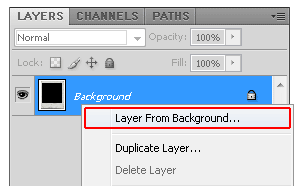
Open the Polaroid frame image in Photoshop. In the Layers Window (if it’s not open, go to top menu Window > Layers) right click on the Background > Layer From Background
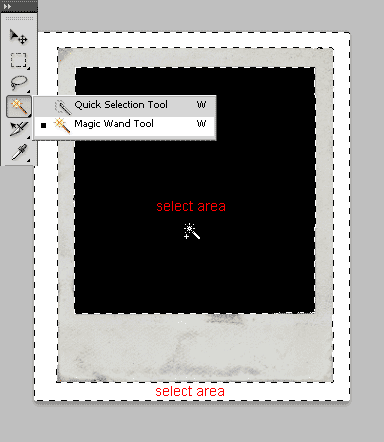
Grab the Magic Wand Tool and while holding down Shift click on the outer white and inner black areas to select them – press Delete and then right click on canvas > Deselect (or Ctrl+D).
Go to top menu and File > Place and select the image you want to frame and then hit Enter to place it.
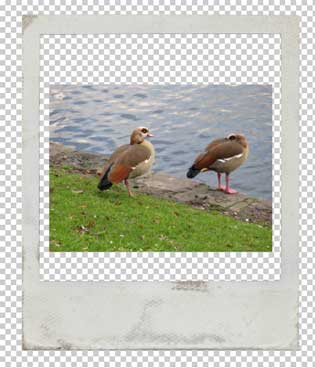
Set the new image layer behind the frame – from the top menu Layer > Arrange > Send to Back (or just drag down the layer in the Layers Window).
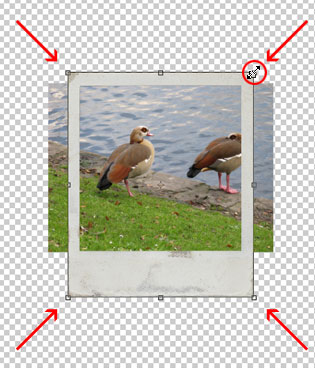
Now depending on which is bigger, the frame or the image, you need to scale the larger one down. In most cases the Polaroid will be larger, so select its layer in the Layers Window by clicking on it and from top menu Edit > Transform > Scale (or Ctrl+T).
Hold Shift and drag with the mouse any of the frame corners. You can let go the mouse and Shift if you need to reposition it and then repeat Shift + drag to scale up or down until you get the right framing. Hit Enter when you’re done. – (Note: Holding Shift+Alt while dragging scales it proportionally from the center.)
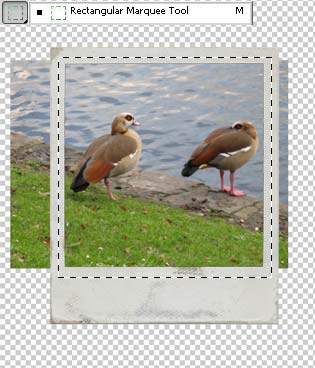
Select the layer with your image in the Layers Window (use the Move Tool (V) if you need to center your subjects). Now grab the Rectangular Marquee Tool and drag a rectangle along the Polaroid frame.
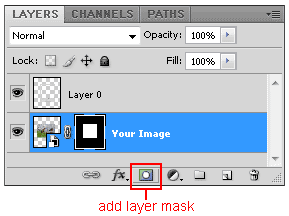
In the Layers Window click the Add Layer Mask button
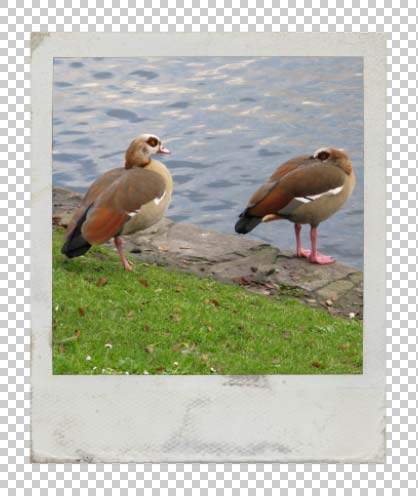
And you should have your final picture.
Additional Notes:
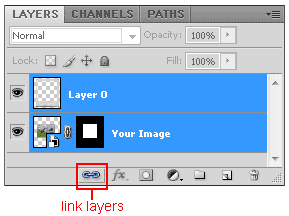
• To keep the layers together while you move them, select them both and you can either press Ctr+G to group them or you can click on the Link Layers button in the Layers Window.
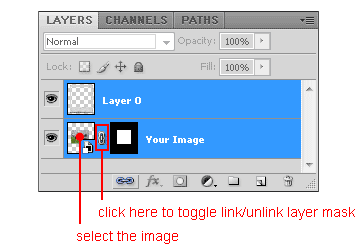
• If you want to re-frame your image you can unlink the layer mask in the Layer Window by clicking on that small icon between them. Make sure you have the image selected and not the layer mask and you can move it around; the layer mask will stay in the same place. Once you are finished click again in the area between the image and mask to relink them.

Thank you for sharing these. They are really cool! Also, thanks for sharing all this great stuff. I forget to leave a comment…thought I should let you know how much these are appreciated.
Brilliant!… cheers for the freebie. Will use them for a current project
Great, great!Tanks a lot…
thanks
thank you so much! love these!
Awesome! you are my idol!
Many thanks!
I’ve been ripping photo’s out of poloroid frames for ever, this is a diety send!
Thanks God, I’d found this link! I love vintage style and I’ve always wanted to use Polaroid frames on my photos! thanks thanks thanks
greetings
Thanks a lot! very useful :)
thank you so much for the Polaroids! :)
Is there a version of them available with a transparent background by any chance? That would be very helpful!
please let me know. :)
Hi Sarah,
The Polaroid images from the download section above are high resolution and they have uniform color backgrounds which can be easily selected and deleted. What image editing software are you using? If you must have them with a transparent background, let me know which ones you need and I will email them to you.
Hi,
I’m not that experienced in Photo editing.
If possible I’ld like to have all of them with a transparent background because they’re all really cool looking. :)
(this is a different Sarah lol)
I’m not too good at Photoshop and I can’t seem to figure out the measurements of the black background. I want to put a picture in the frame but I’m not sure how?
I’ve been trying for days! :)
These frames are the best I’ve ever seen!
Hi different Sarah :)
I will email you a quick tutorial on how to do it.
hi thanks for these awesome images! is it possible for you to send me a tutorial too?? thanks a lot!
Hi Carol,
I’ll email it soon.
I am also a beginner on Photoshop so would really appreciate any instructions on how to add a picture to the frame. Thanks so much for providing these. They are awesome. I am in the middle of creating a 50 year scrapbook for my husband’s upcoming birthday so these will work out great.
Hi Valerie,
I’ll email you the tutorial as well.
Hi! I love polaroids!
Could you send me a tutorial too?
:)
Hi everyone, I just added a tutorial right above the download section.
Ha, ha, decided that was easier? Love your stuff!!
lol yes :)
Thank you for the wonderful layouts.
Thank you so much!! I appreciate this very cool freebie. Awesome!!
Awesome, thanks!!
Thanks for the share!!!
B-
These are great! exactly what I was looking for! Thanks!
Love these!
Thanks for the share ;)
Thanks! :)
Who made the photos of the Polaroids?
Hi Mic,
All the resources from this website are made by me. The Polaroid images are scans of actual frames.
waw, thank you for the tutoriaal!!!
Thank you! These are awesome!
Just realise that some of these are actually scans of the BACKS of the Polaroids. Fake Polas are ridiculous enough as it is, let alone using the backs of them to “frame” photos.
Polaroids can be cool design elements, but downloading and using the frames is voluntary ;)
Also “some of these” is actually “only 3 of these”, which is clearly noted in the description text above – “There are 14 unique Polaroid blank frames plus 3 backsides”
Cheers dude! Exactly what I was after :)
You really deliver… and are such a good role model being so polite with the hater. Thanks.
God bless you… you’re a champ bro!
So cool! Thanks for sharing!
These are great! Thank you :)
These are great! Thanks so much!
Send me a tutorial please :)
The turorial is right above the download button – here.
Love these but my mac doesn’t seem to be able to open the zipped file. What format are the pictures?
They are jpgs. Don’t know why that’s happening… What program are you using to unzip? stuffit? Maybe also try winzip or winrar or 7zip for mac. Let me know if that works.
Thanks so much for all this cool stuff!!
Thank you!!!
Thanks for sharing! Love your site!
Thank you. This is awesome.
These were awesome. Great quality. I gave these a link in a blog post that is scheduled for tomorrow morning. Thanks so much for sharing! :-)
Love them! :) Are you making a second set?
Thanks! I don’t have other Polaroids at the moment, but I’m always on the lookout for things. :)
Thank You for sharing the best frames i’ve ever seen!!!
Thank you! Love your site. Found it on Pugly Pixel.
Thanks again!!!!
These are awesome thank you!
I just discovered you. Thanks so much for sharing your work! Love these polaroid frames!
thank you!
C’est génial ! merci !
These are wonderful! Thanks you so much for sharing!
Hi, i dont know how to use photoshop either…i only have microsoft photo and paint on my computer. is there any way that i can use these on my photos another way? they’re amazing! send me an email if you can…thanks :)
You would need an image editor with layer support. For a basic one you can use Paint.net or if you want something more complex try Gimp. And just search for tutorials on youtube on how to work with layers in the respective program. After you familiarize yourself with that, you could use similar steps as in my above tutorial to frame your own photos. Hope that helps!
Oh wow!! Thank you so MUCH! These are perfect! <3
This is a GREAT resource! Thank you so much for providing high resolution too! Really stoked on this!
Awesome! Did you scan the Polaroids to get the great result or photographed them?
I scanned them.
Stupendous thank you for this and the many other objects you make available to us. I have not given you any tweets, because, believe it or not, I do not belong to any social networks because I do not have time to spend on them.
Thank you so much, these are amaaaaaaazing!
:D
Thank you :)
This is a great and reliable post! Thank you! But, will you please send me also a tutorial on how to do it? I’ve downloaded it, thank you very much!
Hi Trina,
I added a tutorial right above the download button – here.
Thank You!!!!!
These are GREAT!!! Thanks.
thanx!
These are fantastic! Thanks so much for sharing!!!
These are great, thanks for sharing
Thanks so much, love these!
thanks so much;)
Thank you, I really appreciate these! Polaroid film is so expensive for me at least I can get the “look” now. :-)
GOOD LOOKIN OUT!! THANK YOU!!
Awesome!! Thanks for posting the tutorial too.
WOW!!!! Thank you so much for all your fantastic resources AND making them free!!!!
These Polaroid frames are just what I have been looking for. Thank you, they are really great, as is the tutorial!
I used two of the frames in a new post today. They were perfect for the scanned image I wanted to use.
I posted a link back to your site, just had to share your work with all the visitors to my site.
Thanks for the Polaroid but I have photoshop elements 9 and I was wondering how I would do this in PSE .can I have them as layered templates? That way I can mask my image onto the Polaroid frames
Thanks for your help
So after you erase the background from the Polaroid frame you can place your image behind it. Adjust them so your image fills the inside of the frame and then instead of using a layer mask you can just erase the parts that extend outside the frame. Hope that helps!:)
These are so neat! Thanks for sharing.
Carmen L
Wow, you are really generous. I have just found your site and love the freebies – thankyou so much
Very usefull… thank u for Sharing this !
Brian
SWEET!!! I will def be using these in some of my artings. Thank you!!
Thanks a ton I was searching for something like this to use it as a background for my renders for a project im workin on… awesome!! :)
These are brilliant! Thank you very much for sharing these!
thank you very much ^^
YT for the cool frames
Great material
Beatiful. Thanks alot for the freebies!
Thanks fuzzimo – these are lovely!
Thumbs up!
Thank you so much! I run the facebook page for an animal rescue and needed a way to display animals that are up for adoption — along with a place for their names — polaroids are perfect for that! :)
Thanks for providing this awesome site!! You guys are awesome. More free stuff please and thank you.
Every single thing is fantastic. Thanks so much for all the work. Really appreciated.
Hi! This stuff is fantastic, thanks very much for posting. I’m just having a bit of trouble following your instructions after the select, delete, canvas part. I’m on a mac so I can’t right click and I’m new to photoshop. Any help you can give me would be greatly appreciated- thanks very much!
Hi Lisa,
I think one way you can do right click on a Mac is by holding the Control on your keyboard as you click. Without right click you can use the top menu in Photoshop. Instead of right click > Layer From Background you can go to menu Layer > New > Layer From Background and instead of right click Deselect you can go to menu Select > Deselect. Hope that helps!:)
How can I use this?
I’ve tried to use it on Pixlr.com (a photo editing website), and I couldn’t do it. I tried layering it but the picture looks small.
You can try using Gimp. It’s a very good free image editing software; or if you want a simpler editor you can also try Paint.net.
Thank a lot. Thank a lot.
thanks sooooooooo much!!!!! Appreciate this very much!
Thank you so much for these freebies you have shared. I can’t wait to use both of them
Thank you!
Just what I’ve been looking for . Thanks very much and keep up the good work !
Thank you so much for the awesome freebie. I am teaching myself the basics of PSE and these will help me and they are great!
thank you so much for this! can i use it for my tumblr layout? thanks
Yes, you can use them for your tumblr layout.:) My terms are here.
thank you! i really appreciate these. are they available as an .eps or .ai file instead of .jpg for free? please let me know! thank you!!!
Sorry, I don’t have any vector polaroid frames at the moment, though I might make some in the future.
Thanks for these. Using them for a blog post.
I’ve been looking for something like this all day! Thanks for sharing!
Just wanted to tell you that these will save me heaps of time. Much appreciated,
These are f’n great! Sorry about the abbv-swear but I just couldn’t help myself. My family had Polaroid cameras when I was a kid and this is an awesome throwback!
Thanks for sharing!
A
+ it would be funny if I couldn’t do math to submit ;)
many thanx – wonderful, this freebee
I’m using Photoscape, any other version for this program please? Thank you!
You would need to use a program with layer support like Paint.net or Gimp. You can also find some tutorials on youtube on how to work with layers in those programs. Hope that helps! :)
Thanks! Will try! :)
Hey there!
I really dig these, and I was hoping you might have some saved in .png format or with a transparent background.
Thanks!
Hi Amanda,
I’ll email you a couple.
Thanks so much, these are great. Now to check out the rest of your site.
Love polaroids! thank you.
Thank You!!!
OK, so after spending several hours trying to figure this out, I realized your instructions are for PhotoShop and not PhotoShop Elements. Do you happen to have revised instructions for this program? Your polaroids are awesome!
The procedure should be very similar. I think the only difference is when you have to scale the frame. In PS Elements you go to top menu Image > Resize > Scale and drag one of the corners until you get the desired result and hit enter. (while scaling, make sure that the Constrain Proportions box on that bar under the top menu is checked)
Hope it helps! :) Let me know if you get stuck.
omg i love the polariod frames! i wanted one sooo badly but the quatily was bad and all i really wanted was the frame…thank u soooo much!!!!!:)
thanks again for your care and perfect work!
Thank You!
Thank you so much for posting this up for free!!!!!!!!!!!!!!!!!!!!!!!!!! you’re the best!
Thank you very much for your beautiful instruction. It’s really useful!
These are just awesome, thank you so very much and please continue to do what you do!!!!
Thank you, very good. :-)
Wonderful frames! Ever since iPhoneography took off I’m addicted to polaroid frames. They are such a great way to quickly make a great looking art wall in your home. I _SO_ appreciate your generosity by making these available to the world. Thanks so much for sharing and may good Karma forever come your way!
who doesn’t love an awesome freebie. Thanks for sharing!!
Great images!!! TNX!
Thank you so much for sharing these!! They’re awesome!
wow these are gr8t thank you so much hugs Nana Kat
I so appreciate your work and website. Thanks for all you do. Have a great week! JB
Wow ! Thank you so much for these, they are great :-)
Awesome!!! thank you for great sharing :)
thank you for sharing these, they are gorgeous. I am usually pretty proficient in photoshop (I have CS5) and went to follow your tutorial. On some of the frames, when I select with the magic wand, parts of the actual frame are selected along with the outside white background. Do you know what I am doing wrong?
Hi Maribeth,
With the Magic Wand Tool selected, go to the options bar (right under the top menu) and lower the Tolerance to something like 20.
duh me! i should have known that. thanks so much!
fantastic!! i love trying to mimic the look of an old polaroid. used to have this texture but it got lost along the years/computer switches. thanks!!!
hallo! thank you for sharing this wonderful frames! i would like to ask if i can use them in a project i want to make for sale, or are they just for personal use.
Yes, you may use them for both personal and commercial projects, but not to make other redistributable design resources. You can also see my terms here.
ok! thank you!
Thank you. These are great!
I just love the freebie and of course your site’s awesome. Keep it up <3
Hi Fuzzimo, thanks so much for making these available (for free too!), they’re great quality and the instructions were very concise. I’ve used them for a uni project, feel free to have a look at the results :) http://www.flickr.com/photos/lilioubliette/sets/72157629556196121/
Someone mentioned your site to me recently, and now I can see why he told me to check it out! These are great, thank you sooooooo much for sharing!
Obrigado!! muito util.
I just found your page today! Really neat stuff! Thanks so much for sharing!
lovely… thanks!
Hey thanks for all of the great stuff! Clearly you put a lot of effort into this and I appreciate being able to use it!
Fantastic!! The images along with your instructions are wonderful. Thanks for sharing!
love u all….and thx so much
plz continue with new textures…
Thank-you so much for making this available and complimentary. Just Awesome!
Ahh polaroids! I can look at the beautiful blank polaroids all day :) lol
Thanks, really appreciate it! :)
Hi I ove your polaroid frames but can’t find the way to use them them properly, could you send me the tutorial for extreme beginners? :))
Hi Fred,
There’s a tutorial right above the download button. Click on Photoshop Tutorial – Framing Your Images » to expand it.
thank you!
could you pls send me tutorials for apple computer? i cannot download the free tutorials or i’m doing something wrong.
thanks again!
The tutorial is not part of the download. Right above the download button, click where it says: “Photoshop Tutorial – Framing Your Images”.
Hi, I’m Giulia,
Thanks so much, this stuff is the best I’ve ever seen!!!
Another thank you for these images, the quality of your work comes through in everything I’ve seen so far, and you’ve got a great web layout to show it all off. Jealous. :)
Thanks so much for providing such great artwork for designers and novices alike! You’re very talented, creative and most importantly generous in the way you share this work with the rest of us! Thank You!
Hello,
I am interested in making photos into polaroids, but I do not have photoshop. Is there any other way to do it? Any suggestions? Thank you so much for your help!
-Ashley
Yes, you can use Paint.net or Gimp. If you need help with them, search on youtube for tutorials on how to work with layers in either one.
Could you please send size information of black part? Trying to size my photo to fit. Thanks so much!
There’s a short tutorial on how to frame your images right above the download button, here. Click on “Photoshop Tutorial – Framing Your Images” to expand it.
I love how you give us so many different variations of your images. Thank you very much for these and for all of your design offerings!
Thank you for the fabulous templates. I used them for a project and posted them on Pinterest.
Thanks a bunch-I’ll be posting on pinterest too
Hi! I am just making a blog and I found your amazing freebies, how can I get a tutorial? Thanks a lot!
The tutorial is right above the download button. Click on “Photoshop Tutorial – Framing Your Images” to expand it.
Thanks, much appreciated!
they’re awesome!
marci beaucoup…
Hey thanks for these! They are exactly what I was looking for!
Brilliant. I was looking just for one single polaroid frame and now, with your work, I can even choose from 14 different ones. Thank you very much!
These frames are fabulous – thank you so much!
Thanks alot AWESOME!!!! Polaroid frames!!
This is just so cool! Thank you very much for sharing this with everyone =)
OMG, this brings back so many memories. Thank you for this awesome batch. I will just convert them to PNG and make a photo mask as you suggested. Using PSE-8, and it will be a breeze. First time visit through DST newsletter. It is so nice to meet you. Older and Wiser Learner, OWL.
Thanks so much for sharing your great resources!
these are just fantastic! thank-you so much.
You’re so kind! These are much appreciated!
Dyou know the meaning of the word bays? No? Thats you! LOLWUT? Anyway thanks for the frames. MUCH APPRECIATED.
Thanks for sharing these frames people!! =)
Thanks a ton, will use them :)
Thank you so much for this marvelous frames! :)
Luv these frames ! They’re just what I needed. <3
Très jolis cadres. C’est tout ce que je pouvais espérer.
Beautiful and functional, what could be better? Being a newbie with PS some instructions (yes, me too) if possible. <3
Hi LuLu,
There is a tutorial right above the download button.
Thank you! This site is great. Images & tips! Xxo
I love these frames and your tutorial is very helpful! Thanks so much!
Loved it!!
thx thx thx :D
Love all your great stuff. THANKS! hope your generosity is paying off in ads, traffic, and gigs. etc. Let me know if/how I can help promote!
Hi Holly,
Sharing links on facebook, pinterest etc is always appreciated! :) Thanks!
So I downloaded these plus your paper clips and sticky notes, but am not able to open them or seperate them individually. Only option when I click on file is delete. Can you help? Thought I made a real find.
Thx,
D
Hi Dana,
You would have to use an image editing program with layer support to separate and arrange the elements. If you don’t have something like Photoshop, you can use Paint.net or Gimp. And just search for tutorials on how to work with layers in the respective program. Hope that helps!
Thank you a lot!
Thank you so much! I’m using these for a current project that I’m very excited about :D Will post a link when I’m done.
Your site just keeps getting better and better!
Thanks for all your helpful tips and tutorials!
Thanks for sharing!
Hi :) I just wanted to join the others: thanks for all of these stuff. You are really kind and helpful as well. This makes the world a better place I think.
this might be my life-saver right now. im so excited to work on a project with these frames!! I truly appreciate the tutorial and the images.. you guys are awesome!!
ha! i love the little code on the bottom.
Brilliant – thanks :)
hi, ive downloaded them but they wont open up in photoshop, what am i doing wrong? im using CS3 and on a pc, thanks
Hi Natalie,
After you extract them from the zip file you should have a couple of jpg images. Those can be opened in any image editing program.
Thanks for sharing this tutorial and the polaroid frames! I just did some now and I will be featuring this post on my blog (I hope you don’t mind) this week so I hope you come by :)
Hi Samantha,
I don’t mind at all if you mention my post on your blog. I appreciate it! Thanks!
Good Afternoon,
I’m hoping you can help me. I would love to use your poloroid frames but I am unable because I can’t download zip files? I tried unzipping it, but I’m not having any luck. Could you please help me? Thank you.
Hi Vaness,
Did the download interrupt or you are having trouble unzipping the files? I tried getting them now and for me it worked. Have you tried downloading them again? Maybe try it with a different browser or a download manager. Let me know if you still have problems getting them.
Thanks for sharing these antoniu! So much appreciated. :-)
thank you very much, beautiful images.
Thanks for your kindness.
Thank you having such a big heart and sharing all your lovely work!
Really appreciate it! :)
cheerios!
THANKS
Thanks for sharing the Polaroid frames! Awesome graphics, exactly what I was looking for. Much appreciated.
Thanks! Just what I was looking for. :)
Thank you!!
what a kind instruction! Thank you so much!
Awesum stuff! Many thanx!!!
Thank you so much for taking the time to do a tutorial. I am using a photoshop trial to see if I like it and your tutorial was a HUGE help.
Is there a way to do small polaroid frames with photos. Saw a PIN where you can make them into magnets and put several on a page?
Photoshop is foreign to me and I’m trying to learn as much as possible before deciding to buy it or not.
Thanks again.
Hi Cindy,
Make a new document File > New with the dimensions you need for your final piece (you can give it a name or leave it as Untitled-1). Open a polaroid frame (File > Open) and follow the above tutorial. When you are at the last step with the 2 layers in the layers window (your image + frame on top), select them both and right click Convert to Smart Object. Right click on the Smart Object in that layer window and choose Duplicate Layer. In the options box select Destination Document: Untitled-1 (the first document created). Go to the Untitled-1 document and you should see your framed image. Select it and go to top menu Edit > Free Transform to scale or rotate the framed image as you wish. To maintain proportions, hold Shift while transforming – or from right under the top menu click on the icon between W: and H: (Width and Height) to maintain the aspect ratio. After that make another framed image and duplicate again and so on.
Note – if you want to edit a Smart Object (if let’s say you want to change an image from one of the frames), double click on the Smart Object in the layers window and it will open up in a new document. After you are done editing that frame, save it and it will automatically update in your original document. It may be useful if you search for some tutorials on working with layers and smart objects in Photoshop. Hope that helps! :)
Thanks for frames. What is license for it?
Hi Ramunas,
You can read my terms here.
Thanks a lot. Really helpful
Hi, I was wondering if it is possible to download these frames separately? Thanks
Hi Bel,
I don’t have them separately. If the download interrupts try using a download manager. There are also a few of them individually on my flickr account.
¡Guaaaauuuuuu!, muchísimas gracias, estoy haciendo un trabajo que ya verán, y me vienen genial. :*
Natalia Villa.
Thank you so much for sharing. I love these!
This site is great, thanx a mil. Its nice getting a lot of textures I cant get hold of myself. :)
Thanks for sharing!
This will save me a lot of time!
These are great! Thanks for sharing!
thank you so much… these are really great stuff… you are the best!!! greetings from austria
Thanks a lot – this will make my life a bit easier;)! Great!
Thank you so much! Can you please tell me how to do this in Illustrator?
Hi Laura,
Not sure what you mean. What would you want to do in Illustrator? Frame something?
exactly what I needed! thanks for sharing!
Millones de gracias por el tutorial y por las imagenes!!! me ha venido genial!!
thank you so much! i’ve been looking for this for ages.
This place is AwEsOmE !!!! THANK YOU ;~}
great!!! Thanks!!
Super fucking sweet! Thanks for these and everything else!!
I’m not sure if you will get this, but I can’t make the edges outside of the frame disappear. I did what you said, but my magic wand refuses to select outside of the frame so I can delete it. NOt sure what I’m doing wrong?
Hi Kimberly,
Select the Magic Wand Tool and you should have an options bar right under the top menu. Lower the Tolerance to something like 10 or 20 and try again. ( if you don’t see that options bar then go to Windows > Options )
Let me know if that doesn’t solve the problem.
Danke!!!
Das hat mir viel Zeit gespart!
Super!
Gruß
Joachim
furthering is a rather nice word -this is what your creation’s do -they further an act of creativity-thank you
Thank you very much!
That’s exactly what I was looking for and then it’s such an extensive library!
Really helps me right now.
Thank you! Fantastic. Went to leave a tip hoping you had Amazon payments so I could do my one click trick…unfortunately was kicked off PayPal…something about money laundering…lies! …maybe it’s a pain to have both, probably not worth it with your traffic, but thought I would mention it.
Just what i needed – thank you xxx
Thank you so much for this!
Thanks so much, these are fantastic!!
Using them to frame some old family portraits
Nicole
South Africa
thanks guys! these are awesome!!! can’t wait to use them!:D
Amazing. You are incredibly generous to share all these resources.
Thank you so much for this – so grateful. Tip Jar here I come!
Wow, wow, and more wow.
There’s polaroids and photo posts all over the net, but this is by far the most comprehensive and detailed free offering I’ve seen.
PLUS a tutorial ? Super-value. Thank you.
Thanks! :* I’ll use them for my facebook-page!
Great stuff! Wonderful site.
Thanks!!
Brilliant frames, AND at 300ppi – many thanks!!
Thankyou so much! you’ve just made my day! I hope that gives you a warm inner glow!!! thanks again!!
oooooooooo! nice frames
You are sooooooo generous!! These are awesome. thanks for sharing
Thanks much for these!
That’s awesome! Best post ever!!
Thank you so much for sharing! I love these frames!!
Love these, thank you ever so much!
Thank you so much for these!
fantastic! thanks!!!!!!!!!!!! <3
Lovely…. Thank you! You are a great person! :)
Thank you Thank you Thank you! You really are a saver of time and energy and let’s face it…pure annoyance! Thank you for saving me from all 3 of those things and creating some awesome Free Downloads! Keep on doing what you are doing. You are helping a lot of people!
thanks for sharing very much
Thank you for sharing!
That’s Great! Thank you for sharing!!
Just used it for my baby birth announcement!! it rocks. Cheers
Thanks for these! Just happened to stumble across them and they are just what I need. ;)
Thank you!
Thank you so much for these! I’m doing a Graphic Design assessment and they will come in very handy :)
Exactly what I required. Great appreciated!
What a life saver. Thank you
Very handy indeed. Thanks for sharing. These backgrounds are really a time saver. I don’t have to start from scratch.
Thank you so much for making these available. You have great SEO going as the images were in the top search results in Google. Well done.
Helped immensely with school project! thank you so much!
thank you! i will be definitely using these. thanks for sharing!
Thanks so much – very generous of you! Awesome!!!
Thanks for making these!! I’m going to be starting an amateur photography project and wanted polaroids as my theme. I may make my own if I figure out how to without PS but until I’ll be using yours as guidelines! Thanks!
Excellent. Thank you. I was looking for reference for a polaroid photo to use as a frame but now I’m spoilt for choice! I will return to see what other goodies you have here. Thanks for producing this great resource.
Cheers!
These are great, Thanks a mil! ;)
Thankyou :) such a nice one
Thankyou :) such a nice one
Behold the power of the internet!
Thanks
Thank you!!! It’s just perfect!
Thank you so much for these!
Fantastic! thanks U r a genious!
Great, thank you!
Thanks!
Thank you for this, will put them to good use, great quality
Thanks for sharing this!
What?! They’re not even PNGs? Thanks anyway…
Wow, I can’t believe you are GIVING this stuff away! This stuff is better than most textures I have to pay for.
Thank you these are great!
Thank you so much. These were fun to play with and a time saver like none other. I especially loved that you didn’t just give a template, but told us the best way to use the template. Great job!
Thank you. These will be very useful.
Hello ! Thanks a lot for sharing your templates. They are very nice. I used them for some photos. You can have a look at them on my blog or on Flickr : https://www.flickr.com/photos/patbphoto40/17175098516/